Find the story in your footage. Then cut it.
CineLogic logs, transcribes, and understands every clip on your Mac — then Iris, your AI assistant editor, builds the rough cut on a real timeline you can finish in Final Cut Pro.
- 30 days free, cancel anytime
- Footage never leaves your Mac
- Exports to Final Cut Pro
45 min
to log a full TV episode shoot that took 3 days by hand
9 of 12
editors in user testing said they'd pay for CineLogic today
400+ hrs
projected saving per year for a working wedding videographer
The app
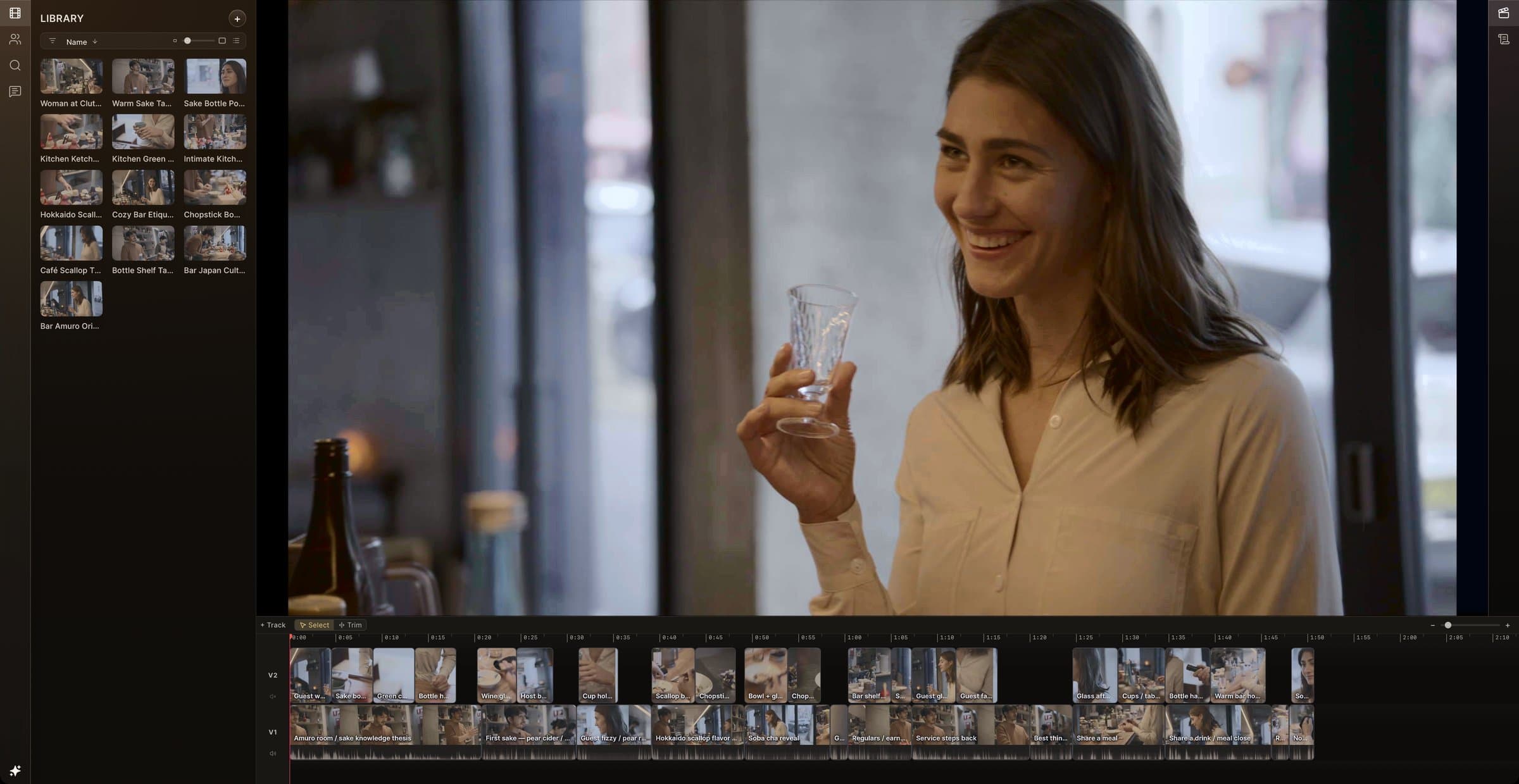
An edit bay that already watched the footage.
Import a shoot and CineLogic logs it for you — transcripts, speakers, faces, objects, and a written summary of every clip. Then cut on a proper timeline.
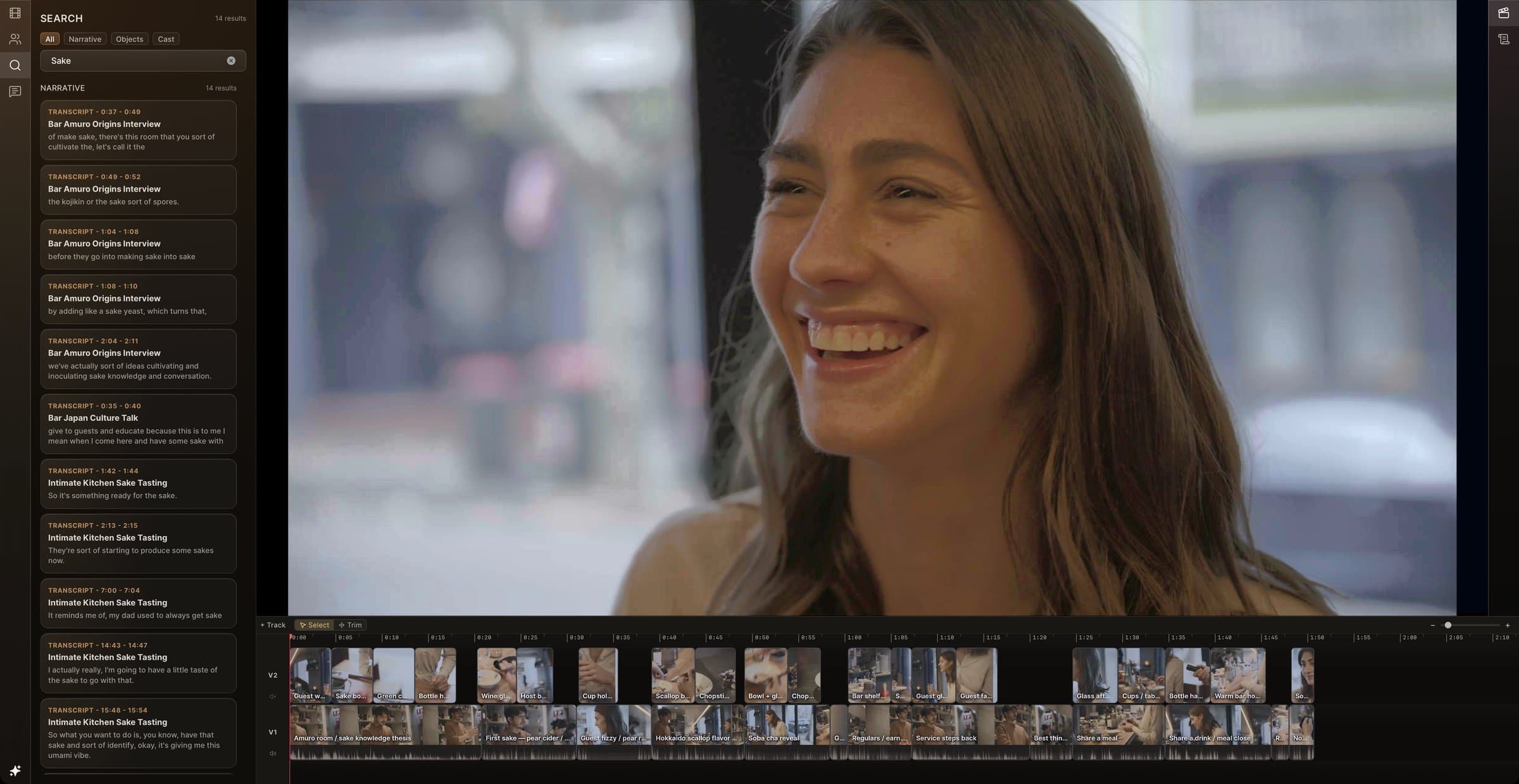
Search what was said, across every clip
- Type a word, get every line that says it, with timecodes
- Filter by narrative, detected objects, or cast
- Click a result to land on the exact word
On-device analysis
Hours of rushes, logged before you're back from lunch.
Transcription, speaker separation, faces, objects, music rhythm, and scene understanding all run locally on Apple Silicon. Nothing to upload, nothing to wait on.
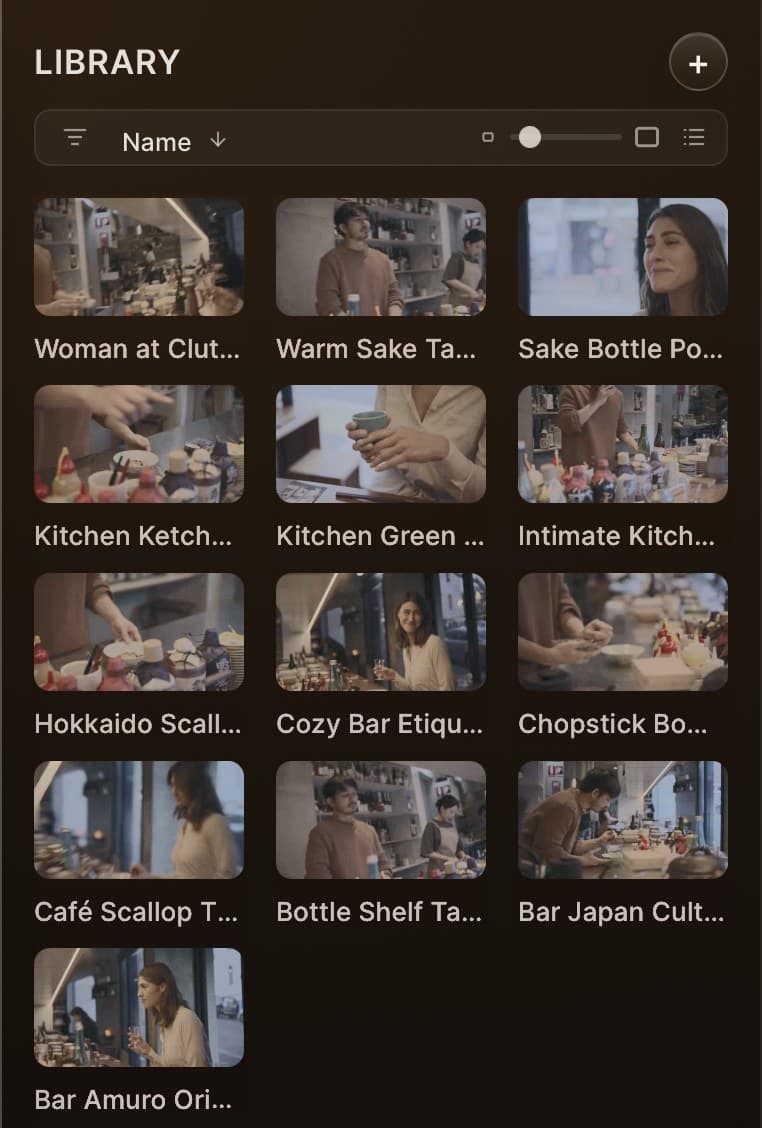
Named for what's in them
Camera files get readable titles from the vision model, so the bin reads like a shot list.
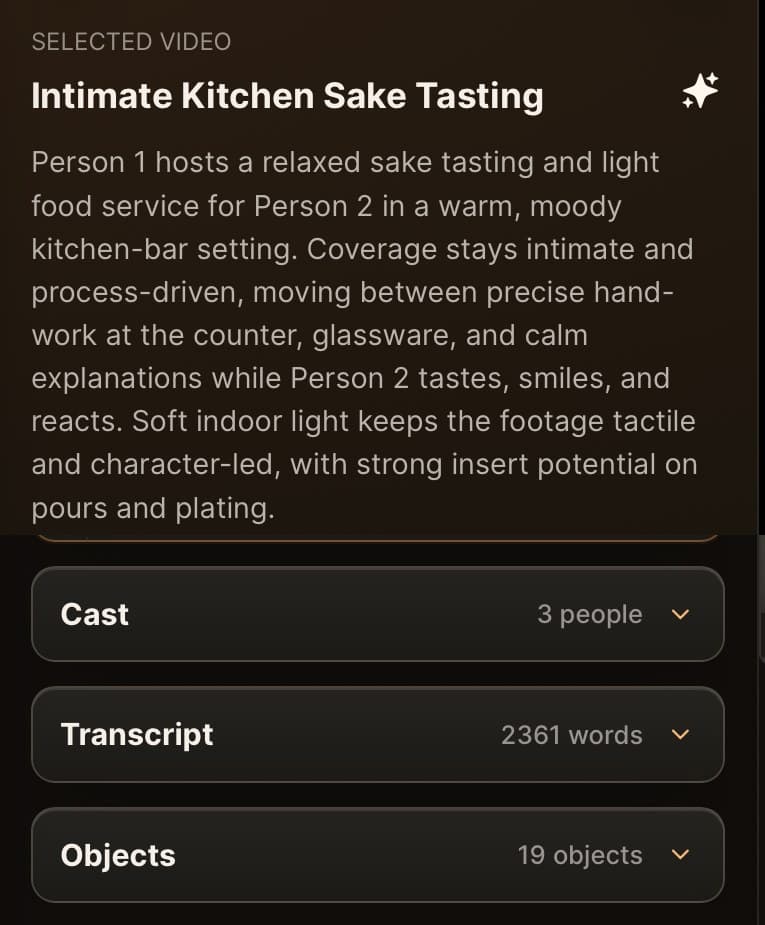
A summary of every clip
Who's in it, what happens, how it's covered — plus cast, transcript, and detected objects.
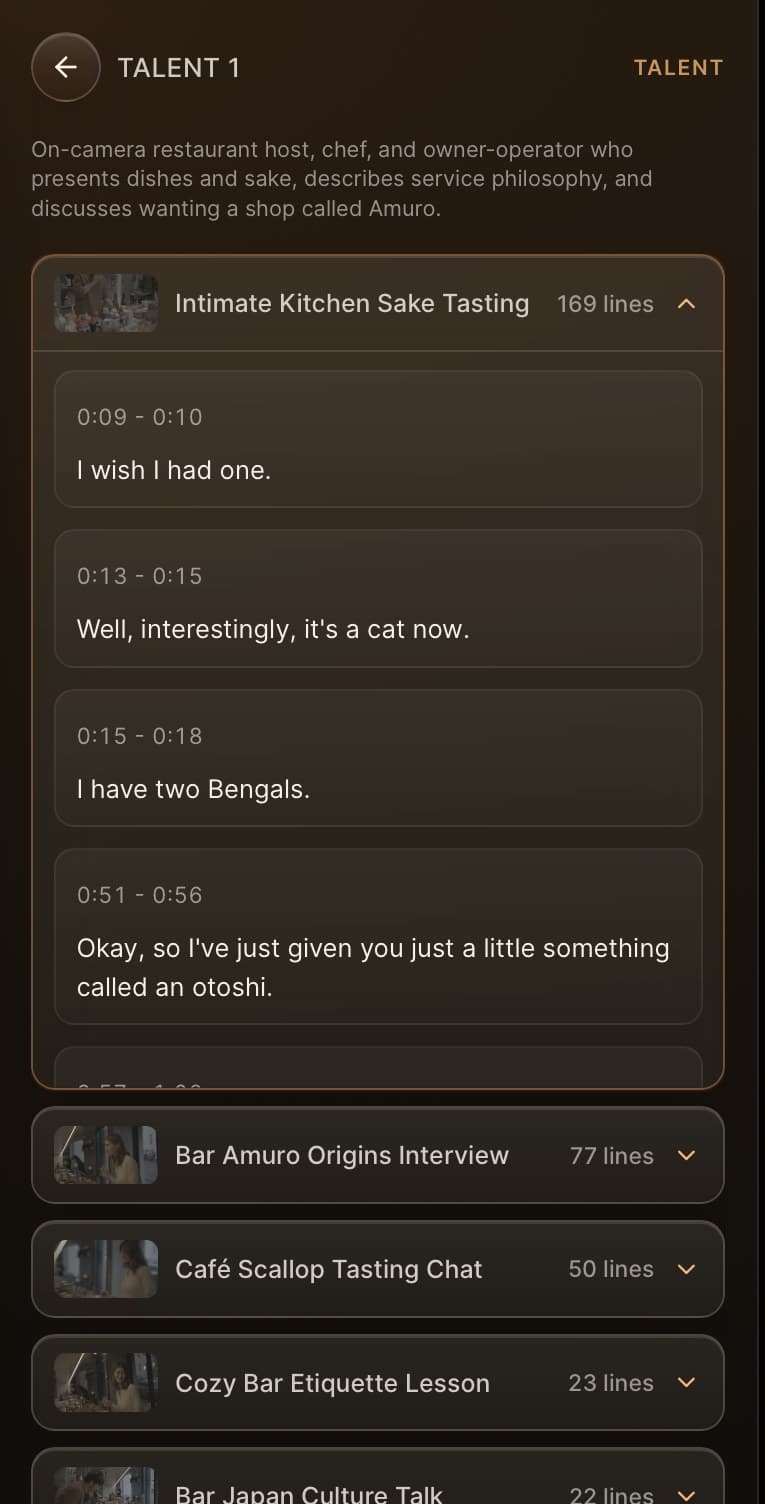
Every line, by person
Speakers are separated and profiled, with each line they said a click away.
Meet Iris
An assistant editor that actually edits.
Iris knows every clip, speaker, and line in your project. Ask for a cut in plain English and she builds it on the timeline — script, A-roll, and cover — for you to refine.
Things editors ask
- “Build a 90-second cut from the tasting interviews. Open on the pour.”
- “Find every time the host explains how sake is made.”
- “Cover the jump cuts on V1 with hands and glassware.”
- “Swap the ending for something warmer.”
Rough cuts run in visible stages — coverage, shape, paper edit, assemble — so you can see how Iris got there.
On the timeline
A dialogue spine on V1. Cover on V2. Ready to trim.
Blocks are labelled by what they say, so you can read the structure of the cut at a glance — then keep editing by hand or by asking.
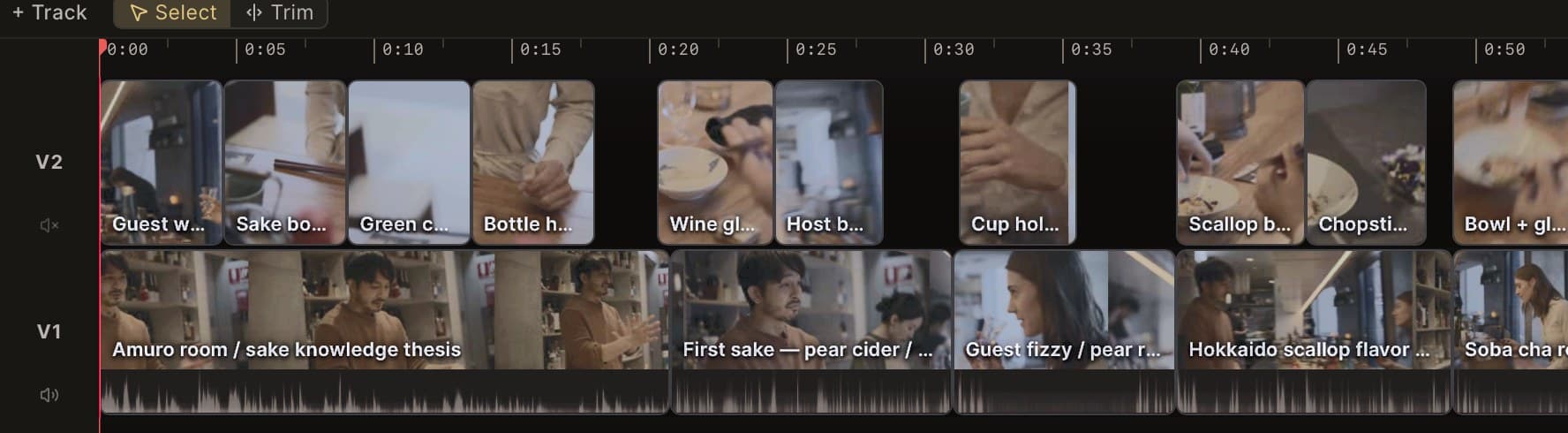
Edits the timeline
41 tools: script, rough cut, insert, trim, slip, ripple, tracks.
Looks at the footage
Asks the on-device vision model what's actually in frame.
Reads your brief
Attach up to four PDF, Word, or Excel files per message.
Takes dictation
Hold the mic and talk; your words stream into the message.
Always undoable
Every change Iris makes lands in your history. ⌘Z.
How it works
From card to cut in four steps.
- 1
Import
Drag in a card, a folder, or a whole shoot. MOV, MP4, and common audio formats — media stays where it lives.
- 2
Let it log
Transcripts, speakers, faces, objects, and scene summaries build in the background while you keep working.
- 3
Shape the story
Search, read the script, and ask Iris for a rough cut. Refine it on the timeline or by editing the text.
- 4
Finish in Final Cut
Export FCPXML and open the cut in Final Cut Pro with clips, tracks, and timing intact.
Everything in the box
Every feature, shipping today.
All of this is in CineLogic 2.5.6 and included in Creator.
On-device analysis
Every clip comes back logged, transcribed, and summarised — on your Mac.
Automatic logging
Transcription, speakers, faces, objects, music, and scene summaries run per clip after import.
Whisper transcription
Word-level transcripts from Whisper large-v3-turbo, running on Apple Silicon with MLX.
Speaker separation
Diarization splits who said what, then groups voices into a cast list.
Visual understanding
A local vision-language model describes scenes; detectors find faces and objects.
Music rhythm
BPM and beat grids for music tracks, ready to cut on the beat.
Built for long footage
Hour-long interviews are processed in windows so memory stays bounded.
Find anything
Search the whole project by what was said, who said it, or what was on screen.
Word-exact search
Search dialogue and land on the exact word, highlighted in the transcript.
Object & cast filters
Filter results by detected objects or by the people in shot.
Talent library
Talent, crew, and unclassified speakers with every line they said, sortable by lines or clips.
Clip intelligence
File, codec, cast, transcript, and detections for any clip in one panel.
Hover scrub
Skim clips straight from the library with generated proxies.
Iris, your assistant editor
Ask in plain English. Iris reads the project and edits the timeline for you.
41 editing tools
Iris can search, inspect clips, write the script, build a rough cut, and make timeline edits.
Looks at your footage
Ask a visual question and Iris checks the frames with the on-device vision model.
Attach the brief
Drop in up to four PDF, Word, or Excel files and Iris works from them.
Dictation
Hold the mic button and talk; streaming speech-to-text fills the message.
Undo anything
Every edit Iris makes lands in your undo history. ⌘Z takes it back.
Clickable answers
Clips, speakers, blocks, and timecodes in replies jump straight to the moment.
Rough cut & script
Go from brief to first assembly, then shape it as text.
Staged rough cut
Coverage → Shape → Paper edit → Assemble, with progress you can watch.
Script view
The cut as text. Delete words to lift them; drag paragraphs to reorder.
Program & context
See unused transcript as ghost text and pull lines back in.
A-roll and B-roll
Dialogue spine plus cover, VO, montage, and holds on separate tracks.
Jump to source
⇧F opens the original take behind any line.
A real timeline
Final Cut-style editing with the shortcuts your hands already know.
Pro trim tools
Slip, slide, roll, ripple, insert (W), and overwrite (D).
Blade & trim
⌘B to split, ⌥[ and ⌥] to trim to the playhead.
Multi-track
Add, rename, reorder, and mute tracks. Group-move selections.
Waveforms & filmstrips
FCP-style clip display with a log-scaled zoom and ⇧Z to fit.
Frame-accurate playback
Space to play, arrow keys to step frames, ⌘← and ⌘→ to jump to either end.
Finish in Final Cut Pro
Hand off a clean timeline, not a flattened render.
FCPXML 1.11 export
File → Export → Final Cut Pro writes a timeline that opens with clips and structure intact.
Handles real-world media
Camera proxies, mixed frame rates, B-roll gaps, and audio metadata carry across.
Talk to Iris
Hands-free voice calls: speak edits, interrupt naturally, and have Iris pull shots up while you talk.
Premiere Pro & DaVinci Resolve
XML export for Premiere and Resolve alongside Final Cut Pro.
Import XML timelines
Bring in FCPXML and Premiere/Resolve XML, with media relinking and offline handling.
Iris notebook
A shared brief and notes that Iris keeps as you work — and she can ring you when a job finishes.
Privacy
Your footage never leaves your Mac.
Local-first by design, so terabytes of rushes don't have to go anywhere to become searchable. Read exactly what is sent and when.
Media stays on your drive
CineLogic reads footage where it lives. Video and frames are never uploaded to us for processing.
Analysis runs on your Mac
Transcription, speaker separation, vision, and object detection run locally on Apple Silicon with bundled models.
Iris works with text
Iris and scene summaries use the CineLogic service with transcripts and clip metadata — not your media files.
Built for sensitive projects
Unreleased work, NDA shoots, and client rushes stay inside the edit bay instead of a public cloud bucket.
Pricing
One plan. Everything included.
Try every feature free for 30 days. Cancel from your account any time before the trial ends and you won't be charged.
Creator
For editors, producers, and small teams.
Billed $198.96 per year after your free trial.
Start 30-day free trialRequires an Apple Silicon Mac. System requirements
- Unlimited projects and media
- On-device transcription, speakers, vision, and objects
- Iris assistant with 41 editing tools
- Rough cut, script view, and multi-track timeline
- FCPXML export to Final Cut Pro
- All updates while you're subscribed
Studios & facilities
Rolling CineLogic out across an edit floor, a network, or a post house? We'll help with volume licensing, onboarding, and security reviews.
Who we are
By filmmakers, for filmmakers.
40+ years of combined editing experience, a successful technology acquisition, and frontline EU regulatory expertise. We build for the edit bay because we've worked in it.
Sharath Ravishankar
Co-Founder, CEO & CPO
20+ years of cinematic storytelling across five continents. Award-winning filmmaker who built CineLogic because he was tired of spending more time logging footage than crafting narratives.
Louis Hunter
Co-Founder & CMO
Multi-medium narrative expertise spanning theater, film, video game animation, and motion capture. Ensures CineLogic adapts to each creator's unique storytelling process.
Harold Mattner
CTO
Built intelligence-powered platforms that led to successful acquisition. Architect of CineLogic's on-device ML pipeline with deep expertise in Swift, Metal optimisation, and distributed systems.
Niklas Eder
Strategic Advisor
Co-Founder & COO of User Rights, the first EU-certified body under the Digital Services Act. Advising on technology governance and regulatory strategy across Oxford, Yale, and Columbia.
Questions
Answers, before you ask.
How does the free trial work?
Create an account, download the app, and start the Creator 30-day free trial from your account page. You add a payment method at checkout but aren't charged until the 30 days are up. Cancel from your account any time before then and you pay nothing. CineLogic needs an active trial or Creator subscription to run, so after the trial it keeps working only while you're subscribed.
How much is CineLogic after the trial?
Creator is $19.99 a month, or $16.58 a month billed annually ($198.96 a year). Every feature is included.
Does my footage leave my Mac?
No. Media files stay on your drive, and transcription, speaker separation, and vision analysis run on your Mac. Iris and scene summaries use the CineLogic service with text — transcripts and clip metadata — never your video files.
What do I need to run it?
An Apple Silicon Mac (M1 or newer). We recommend 16 GB of unified memory and about 10 GB of free disk space for the app and its on-device models. You need an internet connection to sign in, use Iris, and get updates.
Which editing apps can I send a cut to?
Today CineLogic exports FCPXML that opens in Final Cut Pro with clips, tracks, and timing intact. Premiere Pro and DaVinci Resolve export, plus XML import, are in testing now.
Is Iris just a chatbot?
No. Iris drives the same project and timeline tools you do — search, script, rough cut, insert, trim, slip, ripple, and track edits — and can look at your footage with the on-device vision model. Every change is undoable.
What file formats can I import?
MOV, MP4, M4V, MKV, WebM, and AVI video, plus MP3, WAV, M4A, AAC, FLAC, OGG, and AIFF audio. ProRes and H.264/H.265 camera files work well.
Can my whole team use it?
Each editor signs up and installs on their own Mac. For volume licensing or a facility rollout, email hi@mindmade.co.
Who makes CineLogic?
CineLogic is built in Sydney by MindMade Holdings — filmmakers and engineers led by Sharath Ravishankar (CEO), Louis Hunter (CMO), and Harold Mattner (CTO).

Your next cut starts with knowing what you shot.
Sign up, download CineLogic for Mac, and use every feature free for 30 days.
Version 2.5.6 · Apple Silicon · Already have an account? Sign in